AT A GLANCE
The product in context.
The K400 Plus combines a wireless keyboard and a touchpad for controlling a computer connected to a television or larger display. It can reduce the number of separate controls in a temporary setup, provided the host accepts its USB receiver.
This is a researched editorial overview based on the linked manufacturer information. This product is not in the owner’s collection and has not been tested by GadgetsBag. Pros, cons and the assessment are provisional, not firsthand findings.
A CLOSER LOOK
Photo gallery.
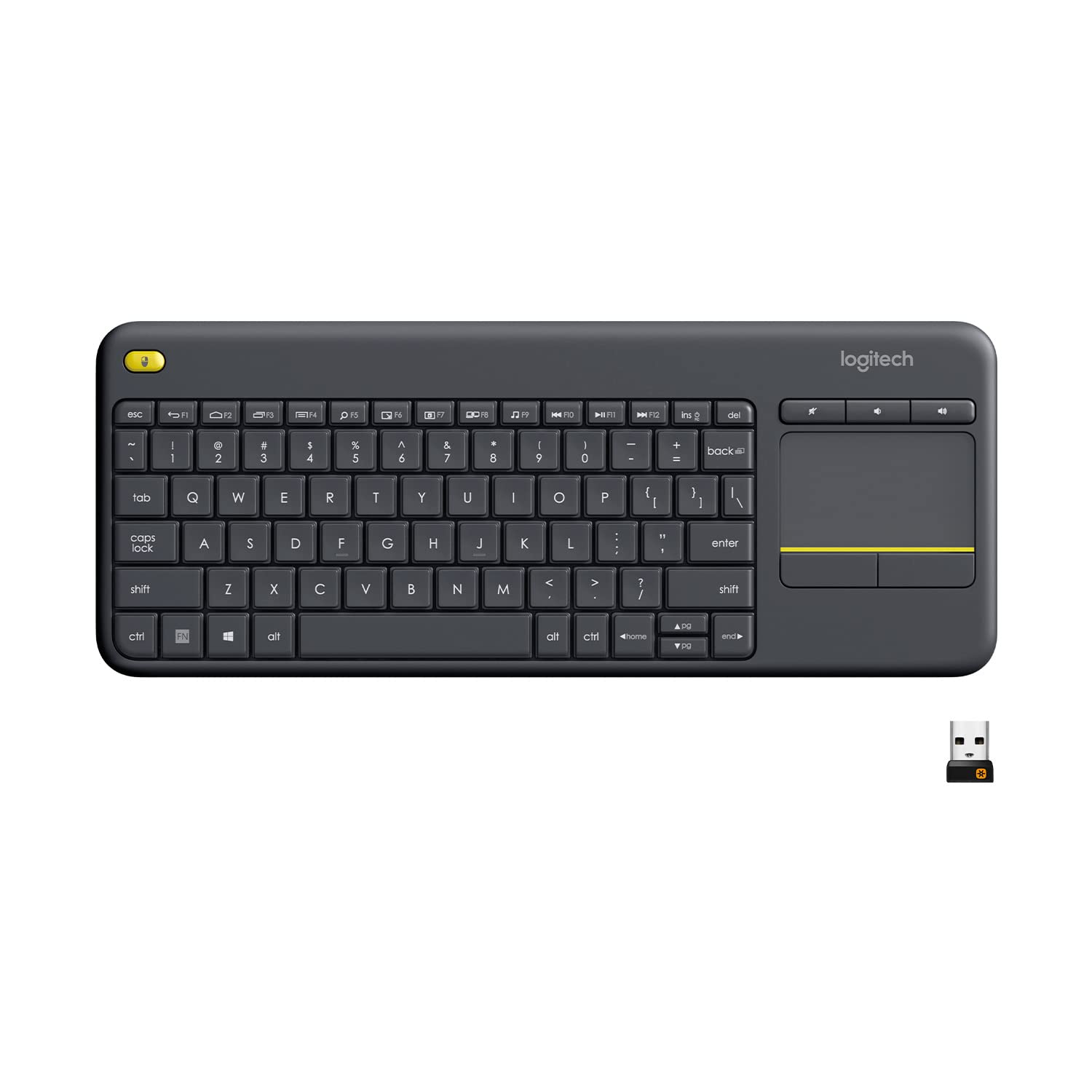
Image 1 of 4
Choose a thumbnail, then tap the large photo to enlarge it. Use the viewer arrows or swipe to explore. Product imagery is credited to its source.
THE PUBLISHED DETAILS
Product specifications.
- Connection
- 2.4GHz wireless via USB Unifying receiver
- Pointer
- Integrated touchpad
- Wireless range claim
- Up to 10m; environment dependent
- Battery claim
- Up to 18 months; use and settings dependent
- Listed host support
- Windows, Android and Chrome OS; verify device compatibility
- Colour
- Black
- Bluetooth
- Uses the USB receiver; not a Bluetooth keyboard
Source: Product specifications and feature notes ↗. Manufacturer or listing claims are not our measurements. Check the exact regional variant.
THE PRACTICAL PERSPECTIVE
Overall review.
The receiver is essential
This keyboard needs a host with a suitable USB port and input-device support. It is not a Bluetooth model to pair directly with any phone or tablet. A USB-C adapter may provide a physical connection, but the host still needs to recognise the receiver and keyboard/touchpad functions.
Think PC-to-TV rather than universal TV control
An integrated touchpad is useful when navigating a computer on a larger screen. Do not assume all smart-TV apps, televisions or streaming sticks accept it. Check the specific device’s keyboard and pointer support before choosing it as a living-room controller.
Convenient controls with some compromises
The touchpad avoids packing a separate mouse, though extended precision work may still suit a dedicated pointer. The advertised range and battery life are maxima rather than GadgetsBag measurements. Keep track of the receiver when moving between locations.
Sources and related reading
WEIGH THE TRADE-OFFS
Pros & cons.
Based on published features and editorial assessment; not test results.
Pros
- Integrated touchpad reduces separate peripherals
- Media controls suit a compatible PC-to-TV setup
- USB receiver offers straightforward supported-host connection
Cons
- No direct Bluetooth pairing
- TV and mobile compatibility depends on host support
- Not a replacement for a precision mouse in every workflow
Who is it for?
Worth considering for
- Users controlling a PC-connected display or a compatible temporary desk
Think about first
- USB receiver support
- Touchpad behaviour on the intended host
- Keyboard size in the travel bag
THE TAKEAWAY
Our assessment.
A focused option for a supported PC-to-TV setup. For direct Bluetooth tablet pairing, consider a different keyboard.
Provisional assessment · Hands-on testing pendingWhat we still need to test.
These checks will help turn the initial assessment into a hands-on review.
- Receiver connection and range in the room
- Media shortcuts and touchpad gestures
Read our editorial policy.