AT A GLANCE
The product in context.
Similar-looking USB-C hubs can have different port capabilities. This overview covers UGREEN Revodok 105 model 15495/CM478 with one USB-A 3.0 data port and two USB-A 2.0 ports. It should not be confused with model 15596, which has a different USB-A arrangement.
This is a researched editorial overview based on the linked manufacturer information. This product is not in the owner’s collection and has not been tested by GadgetsBag. Pros, cons and the assessment are provisional, not firsthand findings.
A CLOSER LOOK
Photo gallery.
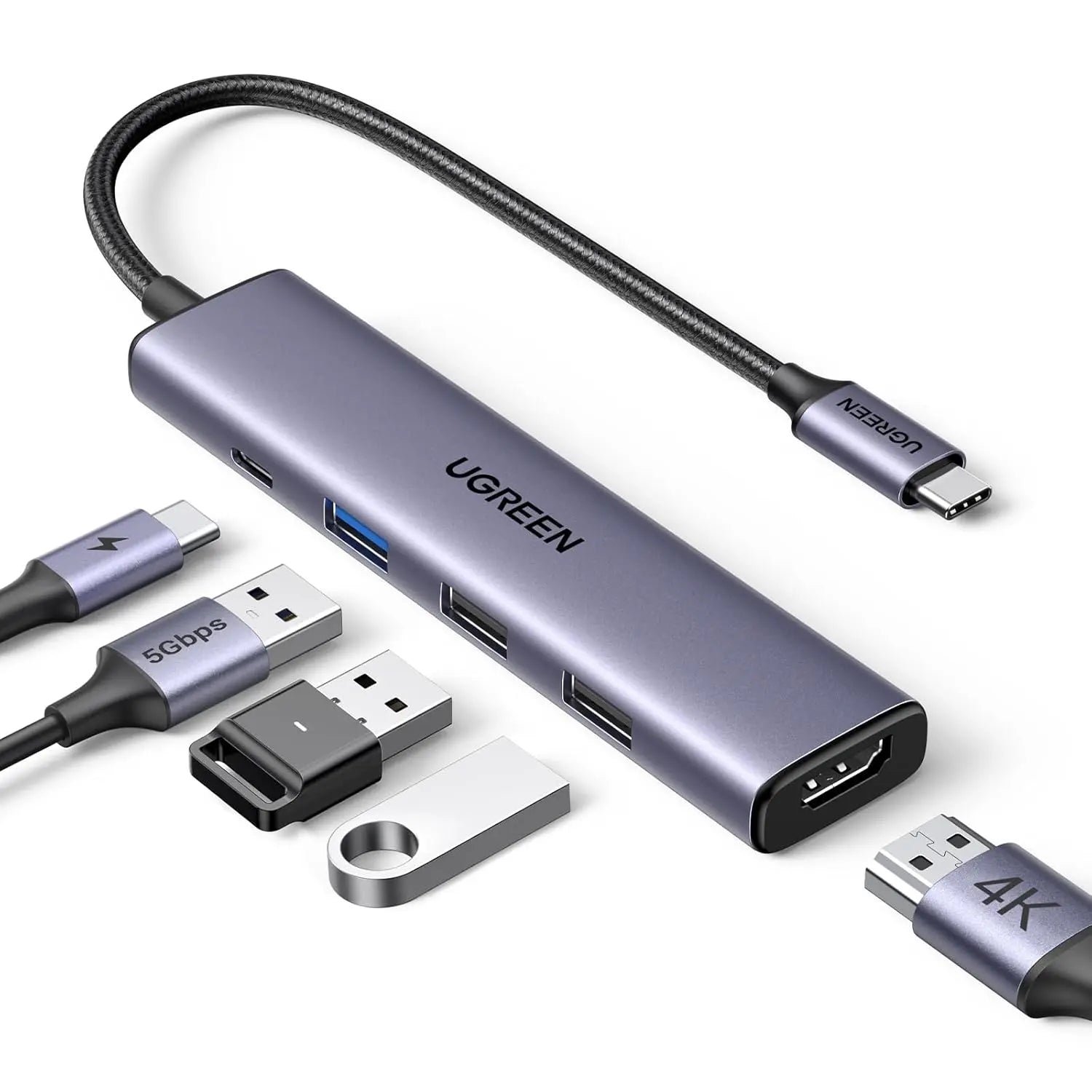
Image 1 of 4
Choose a thumbnail, then tap the large photo to enlarge it. Use the viewer arrows or swipe to explore. Product imagery is credited to its source.
THE PUBLISHED DETAILS
Product specifications.
- Model
- Revodok 105, 15495 / CM478
- Host connection
- Attached USB-C cable
- Display output
- One HDMI output, up to 4K at 30Hz with a supported host
- Fast data port
- One USB-A 3.0 port, up to 5Gbps
- Accessory ports
- Two USB-A 2.0 ports, up to 480Mbps
- Charging input
- USB-C PD input up to 100W; host delivery is lower and depends on the setup
- USB-C data
- The PD input is for charging, not a spare USB-C data port
- Display requirement
- Host USB-C video output support required
Source: Manufacturer specifications and feature notes ↗. Manufacturer or listing claims are not our measurements. Check the exact regional variant.
THE PRACTICAL PERSPECTIVE
Overall review.
Write a port list before choosing a hub
List the equipment you will actually connect: a display, a mouse receiver and perhaps a drive. Assign the faster USB-A port to the device that needs it. Buying from the number of sockets alone can leave a fast storage device connected to a slower port while an accessory occupies the faster one.
USB-C does not describe every capability
Check the host computer or tablet, the display, the charger and all connecting cables. A USB-C socket on a device does not establish video support. Consider the refresh rate you need too; a display connection that suits slides or occasional work may not suit a high-refresh-rate screen.
Keep the travel setup manageable
A hub can consolidate connections, but each connected item still needs its cable and a place to sit. Leave room for the attached lead and avoid hanging a collection of heavy cables from a small device. We have not tested display output, transfer speeds, power sharing or heat on this unit.
WEIGH THE TRADE-OFFS
Pros & cons.
Based on published features and editorial assessment; not test results.
Pros
- Defined combination of display, charging input and USB-A ports
- Attached host cable reduces one loose part
- Slower accessory ports can leave the faster port for a drive
Cons
- Only one USB-A port offers the stated 5Gbps data rate
- 4K output is limited to 30Hz in the published specification
- Video and charging depend on the host and connected equipment
Who is it for?
Worth considering for
- Laptop users who need one external display
- Portable work setups with USB-A accessories
- Buyers who have checked their USB-C host capabilities
Think about first
- Exact model number and port arrangement
- Power lost to the hub when charging through it
- HDMI cable, supported display mode and a suitable charger
THE TAKEAWAY
Our assessment.
A useful hub format when its exact ports match your equipment. Check model 15495 carefully, assign the faster data port deliberately and verify host support. Real-world display and power performance remain untested here.
Provisional assessment · Hands-on testing pendingWhat we still need to test.
These checks will help turn the initial assessment into a hands-on review.
- Display modes on documented host devices
- Transfers through each data port
- Charging behaviour and temperature with several devices connected
Read our editorial policy.